
Authentication
API Key Authentication
The Aftermarket Portfolio API uses API key authentication. You'll need to include your API credentials in the Authorization header of every request.
Obtaining API Keys
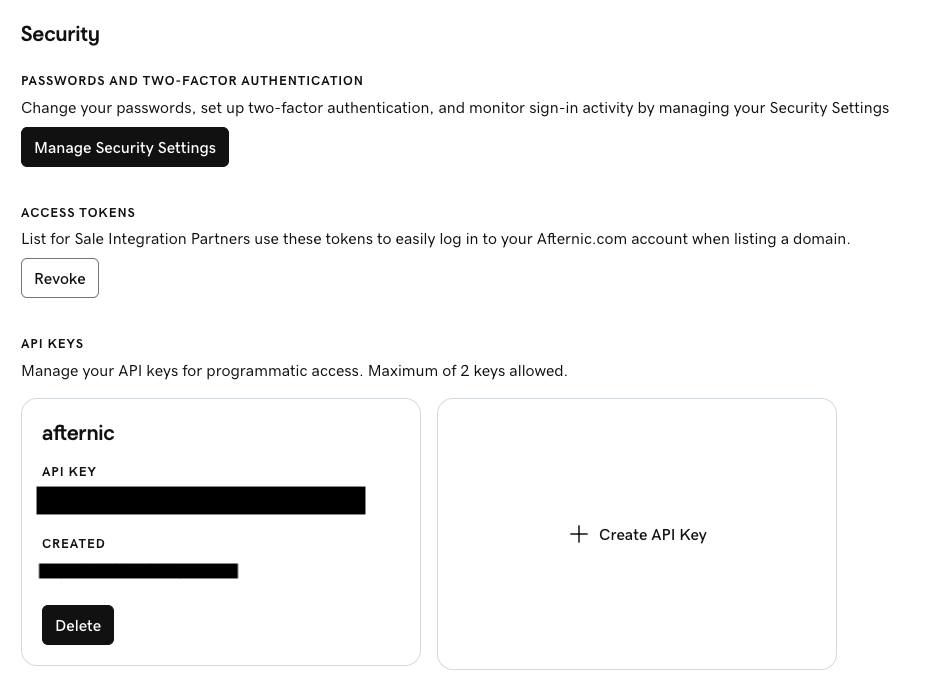
API keys are managed in your Afternic account:
- Sign in to Afternic and go to your Account Profile
- Scroll to the Security section and find API Keys
- Click Create API Key and save both the generated
keyandsecret - You can have a maximum of 2 API keys at a time. To replace one, click Delete on the existing key and create a new one
Using Your API Keys
Include your API credentials in the Authorization header using the following format:
Authorization: sso-key YOUR_API_KEY:YOUR_API_SECRETImportant:
- Save both the generated
keyandsecretsecurely - Never share your API credentials or commit them to version control